How to Check for Plagiarism: A Complete Guide for Writers and Editors

- plagiarism
- editing
- originality
- workflow
- writing
Manual checks, free and paid plagiarism tools, how to read similarity reports, types of plagiarism with examples, and an editorial workflow—plus how AI writing tools change originality work.
How to check for plagiarism depends on your stakes: a blog post due tomorrow, a peer-reviewed manuscript, or a contract that requires a formal similarity report. This guide walks writers and editors through manual triage, free and paid checkers, how to interpret percentages and matches, common plagiarism patterns, what to do when overlap shows up, and how AI-generated drafts fit into originality workflows. For a shorter take on what similarity tools actually measure, see Plagiarism checkers: a practical guide.
Manual methods (before you run a checker)
Automated checkers are faster at scale, but manual methods still catch issues databases miss—and they cost nothing except time.
Google search and exact-phrase searching
Take 2–4 suspicious sentences (or a distinctive clause) and paste them into Google inside quotation marks for exact phrase search. If a passage appears verbatim on another site, you will often see it immediately. For longer overlaps, try non-contiguous phrases: quote the opening and a middle fragment in separate searches. If the author’s voice suddenly shifts into textbook-smooth prose, search those lines first.
Tips: Strip quotation marks from the draft when testing (search the plain string). Remove reference numbers and bullets that break the phrase. Try both web and News if the source might be journalism.
Reverse image search for figures and slides
Editors reviewing slides, infographics, or figures should run images through Google Images, TinEye, or Bing Visual Search. Charts lifted from reports, stock photos used without license, and diagrams copied from papers often surface this way. Text-first plagiarism tools may never see them.
Side-by-side reading and memory checks
When you know the author’s other work, open two documents and compare structure—not only wording. Mosaic plagiarism (see below) sometimes evades string matching but shows up when section order and argument sequence mirror a single source.
When manual checks outperform automation
Manual review shines when: the source is offline or paywalled in a way crawlers rarely index; the reuse is structural (same outline, new words); the problem is an uncited dataset or stolen figure; or you are vetting translations where the English is original but the ideas are not. Build 15–30 minutes of manual search into high-stakes workflows even when you also run a checker.
Free plagiarism checkers and their limitations
Free plagiarism checkers are useful for spot checks, but most share constraints:
| Limitation | Why it matters | |------------|----------------| | Smaller or stale indexes | Fewer web pages and books in the corpus means false negatives for paraphrased or niche sources. | | Length caps | You may only scan the first N words unless you upgrade. | | Privacy | Some free services retain or train on submitted text unless their terms forbid it—avoid pasting confidential or unpublished work without reading the policy. | | Aggressive upselling | Reports may be partial until you pay; export and history often sit behind a paywall. | | False positives | Common phrases, boilerplate, and references can inflate similarity. |
Use free tools for early triage, then move to an approved checker for anything contractual, academic, or legal. On SynthQuery, the plagiarism checker is part of a broader writing stack; always match the tool to your publisher or institutional requirements.
What “free” usually omits
Expect shallower archives, no LMS integration, and limited export on no-cost tiers. If you are checking student work, your institution may require a specific ecosystem (for example Turnitin inside the LMS) so that repository comparisons and appeals follow one standard. Freelancers should still run a second pass with a paid or platform-backed checker before delivering to a client who cares about verifiable overlap.
Professional tools: comparison for writers and editors
Below is a feature-oriented comparison (not a ranked “accuracy contest”—real-world recall depends on corpus, language, and whether text is paraphrased). Prices change; check each vendor for current plans.
| Tool | Best for | Core features | Typical pricing model | Accuracy / notes | |------|----------|---------------|------------------------|------------------| | SynthQuery | Teams wanting detection, readability, grammar, and similarity in one workflow | Web similarity, optional private corpus on higher tiers, side-by-side matches, API on Pro+ | Free tier + paid plans | Strong on verbatim and close overlap vs indexed web; paraphrase and uncited ideas remain a human judgment call | | Turnitin | Schools and universities | Institutional similarity, repository of student papers where enabled, instructor workflows | Institution-licensed | Deep for academic overlap; not typically a consumer self-serve product | | Grammarly | Writers who already use it for grammar/style | Plagiarism as an add-on to writing assistance | Subscription tiers | Convenient for editorial drafts; treat as one signal among many | | Copyscape | Site owners checking URLs and duplicate web copy | URL searches, batch options for pro users | Credit- or subscription-based | Excellent for web duplicate detection; different shape than “paste a Word doc” student workflows | | Quetext | Individuals wanting a dedicated similarity UI | Color-coded matches, downloadable reports on paid tiers | Freemium | Useful middle ground for freelancers; index scope varies by plan |
How to use this table: Pick the row that matches who pays (you vs. institution), input type (URL vs. paste vs. LMS upload), and whether you need a stored report for audit.
Choosing one primary checker for a team
Agree on one “source of truth” for release candidates: the same exclusions, the same minimum match length, and the same PDF export naming. Switching tools mid-project creates apples-to-oranges percentages and confuses authors. If marketing uses Copyscape for web while legal uses another tool for long PDFs, document both in the style guide so nobody expects a single universal score.
How to interpret plagiarism reports
Similarity reports are statistical summaries, not verdicts. Learn these elements:
Similarity percentage
The overall similarity percentage is the fraction of the submission that overlaps detected sources (exact rules differ by engine). High percentages warrant review; low percentages do not guarantee innocence if the writer paraphrased without attribution. Zero is rare for technical writing because common phrases, citations, and titles repeat.
Matched sources and passages
Open each match. Ask:
- Is this quoted and cited appropriately?
- Is it common knowledge or template language?
- Is it your own prior work (possible self-plagiarism—see below)?
Prioritize long contiguous matches and matches to the same external article over scattered two-word hits.
Excluded quotes, bibliography, and “small matches”
Many tools let you exclude bibliography or blocks in quotation marks. Use exclusions consistently with your style guide. Do not exclude quotes to hide problems—only to align the score with what your policy measures.
Side-by-side review
The best reports show aligned text. If your tool only gives a number, supplement with phrase searching or a second checker.
Thresholds: why “12% vs 18%” is the wrong debate
Policies that fixate on a magic percentage age poorly. Better rules sound like: “No single source above X% without quotation,” or “Investigate any contiguous match over Y words,” or “Disclose reuse of your own prior reports.” Editors should translate the report into obligations: cite, rewrite, or get permission—then record the decision.
International and multilingual text
If the draft mixes languages or uses non-Latin scripts, confirm whether your checker’s index covers those segments. Translated plagiarism (source in another language, target in English) is hard for text-only overlap engines; pair automated scans with bilingual spot checks when the topic is high risk.
Common types of plagiarism (with examples)
| Type | What it is | Short example (illustrative) | |------|------------|--------------------------------| | Direct copy/paste | Verbatim text from a source without quotation and citation | Lifting a paragraph from a blog into a report with no attribution | | Mosaic / patchwork | Borrowing phrases and structure from multiple sources and stitching them together | Alternating sentences from two articles so no single string match is long | | Paraphrasing without citation | Rewording someone else’s ideas or sequence while hiding the source | Summarizing a journal argument point-by-point without crediting the paper | | Self-plagiarism | Reusing your own prior published work in a new context without disclosure | Recycling a conference paper as a journal article without cross-reference | | Accidental plagiarism (cryptomnesia) | Forgetting that a phrase or fact came from something you read | Believing a punchy sentence is yours when it mirrors a source you forgot |
Engines catch copy-paste and sometimes close paraphrase; ideas and structure still need human comparison to policy.
Step-by-step: checking content in a typical workflow
Use these steps with your chosen tool. Replace the bracketed notes with real screenshots for your style guide or client handbook.
- Finalize a clean draft — Remove track-changes noise; ensure references are present so the checker can flag uncited overlap correctly.
- Paste or upload — Stay within character limits; split very long manuscripts if the product requires it.
- Configure exclusions — Set bibliography / quoted blocks per policy so the score reflects what your institution measures.
- Run the scan — Wait for full indexing; avoid refreshing mid-job.
- Review matches in descending severity — Start with longest contiguous matches and primary sources.
- Fix or document — Add citation, rewrite with new structure, or remove redundant copy; quote only when exact wording matters.
- Re-run — Confirm resolved matches disappear or are explained in footnotes.
- Export the report — Save PDF/HTML for audit if your contract requires it.
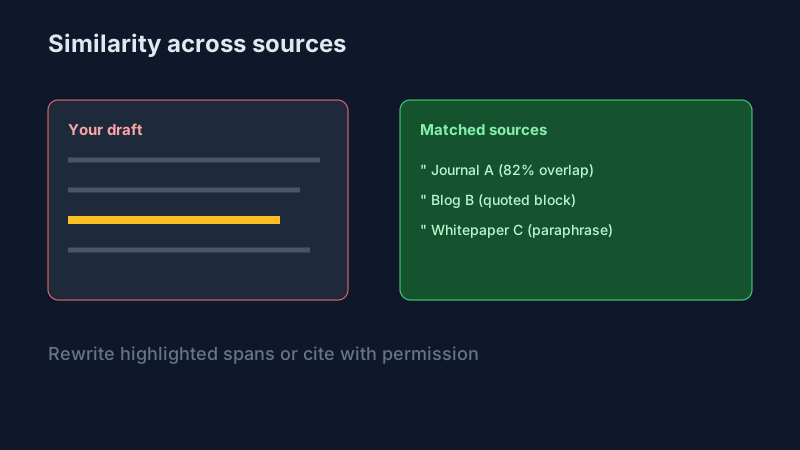
Visual aid: For internal documentation, capture one screenshot per step (draft → settings → report → highlighted passage → export). The figure above illustrates aligned highlights and sources—the pattern is what stakeholders should look for.
Screenshot storyboard (for training decks)
| Step | What to capture | Why it helps reviewers | |------|-----------------|-------------------------| | 1 | Empty tool screen with privacy / data retention notice visible | Proves writers know where text goes | | 2 | Paste region with character count | Shows awareness of limits | | 3 | Settings: exclusions for bibliography | Aligns score with policy | | 4 | Report overview: total % + source list | Teaches triage order | | 5 | Expanded match: side-by-side highlight | Shows the actual fix (cite vs rewrite) | | 6 | Export dialog or downloaded PDF | Audit trail for clients |
Replace product chrome with your approved app; keep captions timeless (“Settings before scan”) so you do not rebuild the deck every UI refresh.
What to do when plagiarism is found (editorial process)
- Pause publication until you understand scope—isolated sentence vs. systematic reuse.
- Gather evidence: similarity report, URLs, dates, and (if applicable) version history from the author.
- Interview proportionally: assume good faith first; cryptomnesia and bad notes happen, but patterns matter.
- Apply policy: rewrite, reject, retract, or escalate per contract or institutional rules—not ad hoc shame.
- Document outcomes for teams: what was fixed, who approved, and where the final report lives.
Editors protect readers and institutions; the goal is correct attribution and trust, not maximum punishment by default.
Escalation paths by severity
Low severity (a forgotten quote on a blog): quick fix, updated byline note if needed, republish. Medium (recurrent short lifts from one competitor): require rewrites, source logs, and a second review on the next three assignments. High (whole sections from paywalled work, or repeat offenses): involve legal or conduct channels per contract—not the same meeting as a line edit. Consistency beats drama: write the escalation ladder down once so every editor applies it the same way.
Preventing plagiarism from the start (citation workflow)
- Capture sources as you write—URL, author, date, page—in one reference manager or project note.
- Mark quotations in the draft so checkers and co-authors see intent.
- Paraphrase from closed books (or after hiding the source) to force your own sentence structures.
- Run similarity checks before final layout, when text is still easy to edit.
- Agree on self-citation rules for teams reusing internal playbooks.
Notes that save careers
Train contributors to keep research notes with pasted snippets clearly marked QUOTE vs PARAPHRASE vs MY WORDS. When a similarity flag appears six months later, those notes are the difference between a fast correction and a trust breakdown. For interviews, log recording consent and transcript filenames so you never confuse a source’s words with the writer’s.
How AI content creation changes the plagiarism landscape
Large language models blend patterns from training data; outputs can echo recognizable phrasing or structure from sources the writer never saw. That blurs the line between misconduct and tool misuse:
- Disclosure: Many publishers now ask whether and how AI was used. Follow your journal or brand policy.
- Fact-checking: Models hallucinate citations; “sounds academic” is not the same as verified.
- Similarity tools: They may flag AI-ish boilerplate differently than human overlap; combine checks with AI detection when policy requires it—not as a single infallible score.
- Human review: Editors should still ask: Who is responsible for accuracy and originality?
Contract cheating and ghostwriting (editor awareness)
Contract cheating (someone else writes the paper) often passes similarity checkers because the text may be original to the web. Overlap tools are not a substitute for process evidence: drafts, outlines, timestamps, and—in educational settings—instructor scaffolding. Pair policy with authentic assessment design; see academic integrity and AI for how institutions frame disclosure and appeals.
Where plagiarism detection meets AI detection
If a draft is AI-generated and then lightly edited, classical string overlap may be low while policy still requires disclosure. In those cases, teams sometimes run AI detection alongside plagiarism—interpret both as signals, not court evidence. For limits of detectors, ChatGPT detection: what tools can’t prove is essential reading.
For broader context on policies, see academic integrity and AI. For making AI-assisted drafts sound more human where appropriate, make AI content sound human complements originality work.
Quick checklist before you hit “publish”
- [ ] Ran an approved similarity check (or institutional Turnitin where required)
- [ ] Reviewed long matches and primary sources
- [ ] Citations and quotation marks align with your style guide
- [ ] Images and figures licensed or original; reverse image search for anything dubious
- [ ] AI use disclosed per contract
- [ ] Final report archived if stakeholders require it
Checking for plagiarism is part craft, part process: combine search, good tools, and clear rules so writers get fair feedback and readers get work they can trust.
Related tools
- Plagiarism checker — Similarity scanning with highlighted matches on SynthQuery
- SynthRead — Readability and structure review after originality fixes
- AI detector — When policy asks for AI-use triage alongside similarity

Itamar Haim
SEO & GEO Lead, SynthQuery
Founder of SynthQuery and SEO/GEO lead. He helps teams ship content that reads well to humans and holds up under AI-assisted search and detection workflows.
He has led organic growth and content strategy engagements with companies including Elementor, Yotpo, and Imagen AI, combining technical SEO with editorial quality.
He writes SynthQuery's public guides on E-E-A-T, AI detection limits, and readability so editorial teams can align practice with how search and generative systems evaluate content.
Related Posts
Plagiarism Detection vs AI Detection: What's the Difference?
Plagiarism checkers and AI detectors solve different problems. Learn how each technology works, what it cannot see, where they overlap, and when to run both—plus a decision guide for classrooms, newsrooms, and content teams.
Plagiarism Checkers: A Practical Guide for Students, Freelancers, and Teams
How similarity detection works, what “plagiarism” means in tools vs. policy, citation edge cases, and a workflow that protects both originality and collaboration.
How to Make AI-Generated Content Sound Human (Without a Humanizer Tool)
Manual editing techniques to make AI drafts feel natural: voice, rhythm, specifics, and a repeatable workflow—plus prompt templates and a checklist so you can pass the human test before you publish.
Get the best of SynthQuery
Tips on readability, AI detection, and content strategy. No spam.